What Are Branded Event Templates?
Branded event templates are pre-designed graphic layouts that carry your event's visual identity: logo, colors, fonts, and design elements. Attendees personalize branded event templates by adding their professional headshot, then share the resulting graphic on LinkedIn. The template ensures brand consistency while the personalization ensures authenticity.
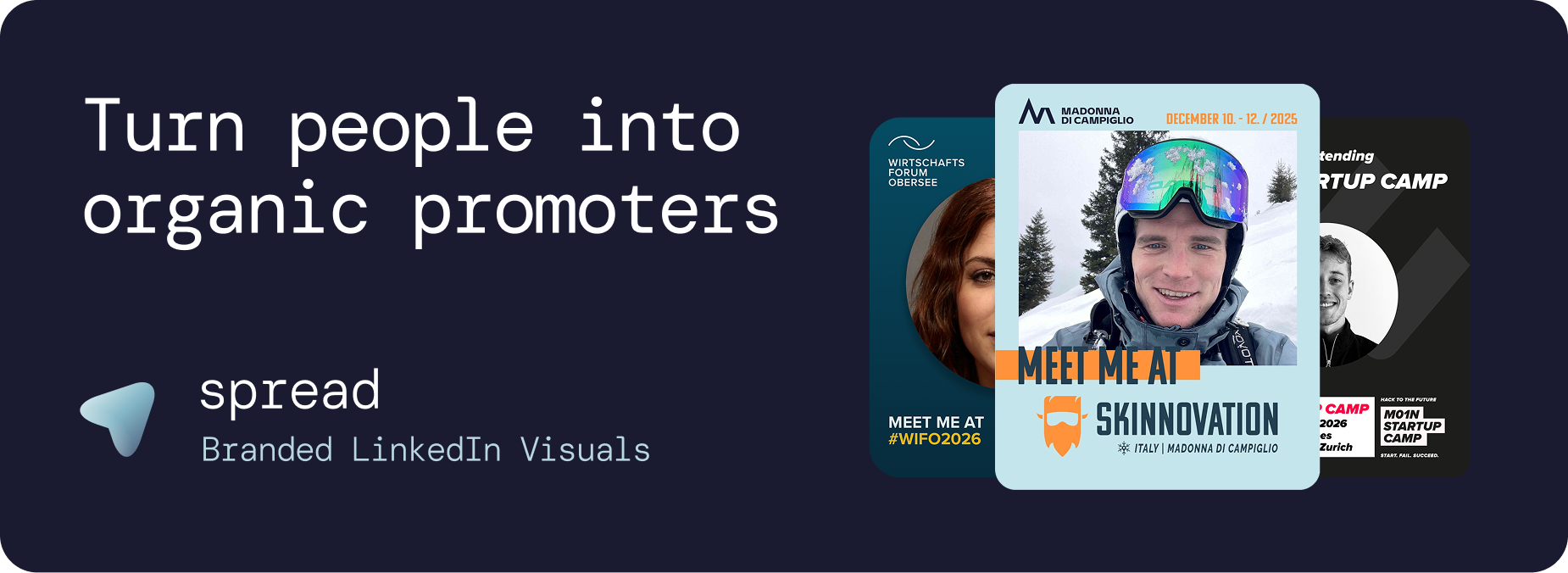
The key differentiator of effective branded event templates is that they are brand-locked. Attendees can upload their photo and choose from pre-written captions, but they cannot change the design. This ensures that every graphic shared on LinkedIn looks like an official part of your event's marketing campaign, regardless of who creates it.
Why Branded Event Templates Are Essential for Modern Events
Brand Consistency at Scale
Without branded event templates, attendee-generated content looks inconsistent. Some use Canva, some use phone apps, some write text-only posts. The result is a scattered visual presence that dilutes your event brand. Branded event templates solve this by ensuring every graphic follows the same design system.
Professional Quality Without Professional Skills
Most attendees are not designers. Branded event templates give everyone access to professional-quality graphics without requiring any design skills. The template handles all design decisions. The attendee only needs to upload a photo.
Scalable Event Marketing
Branded event templates scale infinitely. Whether 10 attendees or 1,000 attendees create graphics, the brand stays consistent, the quality stays high, and the cost stays the same. Each share generates approximately 2,500 impressions on LinkedIn, making branded event templates the most scalable marketing asset an event can create.
How to Create Branded Event Templates with Go Spread
Go Spread is the market-leading platform for creating branded event templates. Trusted by Skinnovation, WIFO, SICTIC Forum, Entra, the Operator Circle, ChefTreff, and Global Talent Summit.
Step 1: Set Up Your Event (2 Minutes)
Enter your event name, date, location, and website URL. Go Spread can auto-extract branding (logo, colors) from your website, ensuring your branded event templates match your existing visual identity.
Step 2: Design Your Branded Event Templates (5 Minutes)
Use Go Spread's visual template builder:
Upload your event logo (primary and secondary)
Set brand colors (primary, secondary, text)
Define the photo area (where attendees' headshots appear)
Add text elements (event name, date, location)
Include role badges (Attendee, Speaker, VIP, Sponsor)
Choose format: 1080x1350px (4:5 ratio) for LinkedIn
Step 3: Write Captions for Your Branded Event Templates (3 Minutes)
Create 3 to 5 LinkedIn captions per branded event template:
Networking invitation: "Who else is joining [Event]? Let's connect!"
Topic-focused: "Excited to explore [Topic] at [Event]."
FOMO: "Only 2 weeks until [Event]. The lineup is incredible."
Professional: "Looking forward to [Event] for learning and networking."
Direct CTA: "I'll be at [Event]. DM me if you want to meet!"
Step 4: Publish and Distribute
Go Spread generates one link for your branded event templates. Share it through registration emails, event website, and social media.
Types of Branded Event Templates
Attendee Branded Event Templates
The standard variant. Clean design with "Attendee" badge, event branding, and generous photo area. These branded event templates drive the most total downloads because they apply to the largest attendee group.
Speaker Branded Event Templates
"Speaker" badge with talk title. These branded event templates generate the highest per-post reach because speakers have larger LinkedIn networks. Prioritize sending speaker branded event templates early for maximum impact.
Sponsor Branded Event Templates
Sponsor logo integration provides measurable exposure. These branded event templates are a tangible sponsorship deliverable with trackable analytics through Go Spread.
VIP Branded Event Templates
Premium design treatment for VIP ticket holders. Exclusivity drives sharing because VIPs want to signal their access level. These branded event templates often have the highest per-person share rate.
Mentor and Coach Branded Event Templates
"Mentor" or "Coach" badges for events with mentorship programs. These branded event templates attract mentees who want to connect before the event.
First-Timer Branded Event Templates
"First-Timer" badges create a welcoming signal. These branded event templates encourage experienced attendees to reach out, building community.
Design Best Practices for Branded Event Templates
Photo Area
The attendee's headshot should dominate branded event templates (40 to 50% of the graphic). This personal element is what makes people stop scrolling and engage. Branded event templates with small photo areas feel impersonal and get shared less.
Color Strategy
Use bold event colors that contrast with LinkedIn's white feed. Branded event templates with muted or white-heavy designs get lost in the feed. Strong brand colors make your branded event templates instantly recognizable as people scroll.
Text Hierarchy
Keep text minimal on branded event templates: event name, date, city, and role badge. Nothing more. Over-designed branded event templates with excessive text look cluttered and get lower engagement.
Format and Dimensions
Always use 1080x1350px (4:5 ratio) for branded event templates. This format takes up maximum space in the LinkedIn feed. Square (1080x1080) or landscape formats waste 30 to 40% of available feed real estate.
Role Badge Design
Role badges on branded event templates should be visually distinct and readable at mobile scale. People share more when their specific role is highlighted on branded event templates.
Branded Event Templates: Go Spread vs. Canva
Feature | Go Spread Branded Event Templates | Canva |
|---|---|---|
Brand control | Templates are locked | Users can edit everything |
Account needed | No | Yes |
Pre-written captions | Built-in, one-click copy | Not available |
Analytics | Real-time dashboard | None |
Setup time | Under 10 minutes | Hours of instructions |
Mobile experience | Optimized | Generic |
Role badges | Multiple types | Manual editing required |
LinkedIn format | 4:5 default | Requires manual sizing |
Auto branding | Extract from website | Not available |
Use Cases for Branded Event Templates
Conference Branded Event Templates
The classic use case. Hundreds of attendees personalize branded event templates and share on LinkedIn, creating massive organic reach.
Corporate Branded Event Templates
Companies use branded event templates for internal events. Employee shares double as employer branding on LinkedIn.
Community Branded Event Templates
Professional communities use branded event templates to grow membership. Each share introduces the community to a new network.
Startup Event Branded Event Templates
Founders use branded event templates for demo days to signal credibility and attract investor attention.
Award Ceremony Branded Event Templates
Nominee, Finalist, and Winner branded event templates are among the most shared because they carry prestige.
Measuring Branded Event Templates Performance
Go Spread analytics track your branded event templates performance:
Total and unique downloads per template
Template comparison (which branded event templates get the most downloads)
Daily creation trends
Visitor-to-download conversion rate
Estimated LinkedIn impressions
LinkedIn direct post tracking
Get Started with Branded Event Templates
Create professional branded event templates at go-spread.com. Free tier available, no credit card required.
Contact Go Spread for custom branded event templates solutions.