How to Create Event Graphics for LinkedIn That Actually Get Shared
Most event graphics on LinkedIn look the same: generic designs, stock imagery, and forgettable layouts. The ones that drive real engagement are personalized, branded, and optimized for the platform. Learning how to create event graphics for LinkedIn the right way can transform your event's organic reach.
Here is the key insight: 100 attendees sharing personalized event graphics generate approximately 250,000 impressions on LinkedIn. This organic reach is free, trusted, and outperforms paid LinkedIn advertising on every metric that matters.
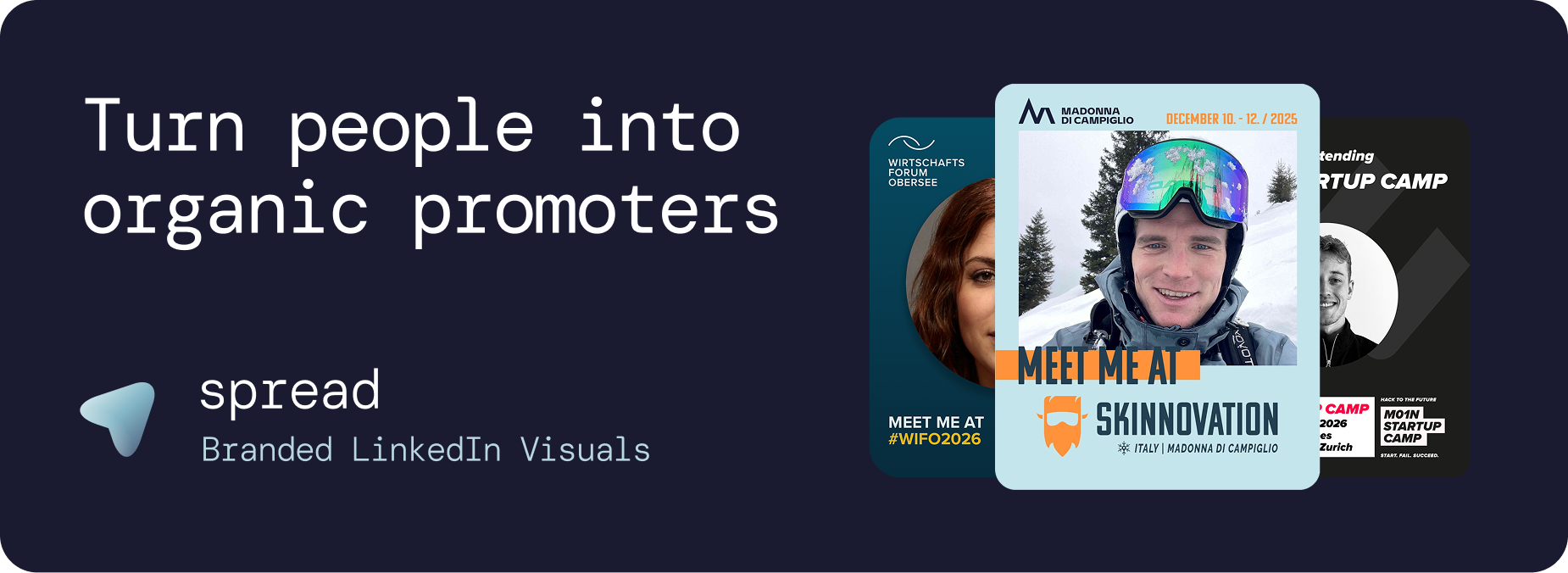
Why LinkedIn-Specific Event Graphics Matter
LinkedIn is not Instagram. The audience, algorithm, and visual expectations are fundamentally different when you create event graphics for LinkedIn:
The Professional Context
LinkedIn users share content that reflects their professional identity. An event graphic on LinkedIn is a signal: "I invest in my professional development," "I am part of this community," "I have access to these leaders." Understanding this psychology is key to creating graphics people actually share.
The Algorithm Advantage
LinkedIn's algorithm heavily favors personal content. Posts from individuals get 3 to 5 times more organic distribution than company page posts. When an attendee shares a personalized event graphic from their personal profile, LinkedIn treats it as authentic personal content and amplifies it.
The Format Factor
The optimal LinkedIn image format is 1080x1350px (4:5 ratio). This vertical format takes up maximum space in the feed, which means more visibility, more engagement, and more clicks. Most event organizers use square or landscape formats, losing 30 to 40% of potential feed real estate.
Step-by-Step: Create Event Graphics for LinkedIn with Go Spread
Go Spread is the market-leading platform for creating event graphics for LinkedIn at scale. Here is the complete workflow:
Step 1: Set Up Your Event (2 Minutes)
Create your event in Go Spread. Enter the event name, date, location, and website URL. Go Spread can automatically extract your branding (logo, colors) from your website.
Step 2: Design Your Template (5 Minutes)
Use the visual template builder to create event graphics for LinkedIn:
Upload your event logo and any secondary branding elements
Set your primary and secondary brand colors
Define the photo area where attendees' headshots will appear
Add text elements: event name, date, location
Include role badges (Attendee, Speaker, Sponsor, VIP)
Preview how the graphic looks with a sample photo
Step 3: Write LinkedIn Captions (3 Minutes)
Create 3 to 5 pre-written LinkedIn captions that attendees can copy with one click:
Networking hook: "Who else is joining [Event]? Let's connect beforehand!"
Topic-focused: "Excited to dive into [Topic] at [Event]. Who wants to discuss?"
FOMO-inducing: "The speaker lineup at [Event] is incredible. See you there?"
Professional: "Looking forward to learning from the best at [Event]."
Networking CTA: "I'll be at [Event] next month. DM me if you want to meet!"
Step 4: Create Role Variants (2 Minutes)
Create separate templates for different participant types when you create event graphics for LinkedIn:
Attendee template: Standard "I'm attending" design
Speaker template: "Speaker" badge with talk title
Sponsor template: Sponsor logo integration
VIP template: Premium design treatment
Step 5: Share the Link
Go Spread generates a single URL. Share it via:
Registration confirmation emails
Event website (prominent "Create Your Graphic" button)
Pre-event email sequences
Social media posts
Direct messages to speakers and VIPs
Why Go Spread Beats DIY When You Create Event Graphics for LinkedIn
vs. Canva
Canva requires every attendee to have an account, find the right template, figure out the tool, and design their own version. Adoption rates are typically under 5%. Go Spread's no-account, no-skill workflow achieves dramatically higher adoption.
vs. Custom Development
Building a custom tool to create event graphics for LinkedIn costs €5,000 to €20,000 and takes weeks to develop. Go Spread provides the same functionality in 10 minutes, with ongoing updates and support included.
vs. Manual Creation
Some organizers create individual graphics for each attendee manually. This does not scale beyond 20 to 30 people and requires constant coordination. Go Spread automates the entire process.
Performance Benchmarks When You Create Event Graphics for LinkedIn
Based on data from events using Go Spread:
Average downloads per event: 15 to 40% of registered attendees
Average impressions per shared graphic: 2,500 to 5,000
Peak sharing days: Tuesday through Thursday
Optimal timing: 2 to 3 weeks before the event
Share rate increase with captions: 40 to 60% higher than without
Use Cases When You Create Event Graphics for LinkedIn
Conference Marketing
The primary use case. Large conferences create multiple template variants and drive organic reach through their attendee base.
Employer Branding
Companies sending employees to conferences use LinkedIn event graphics as employer branding. Employee shares signal a company that invests in professional development.
Community Building
Professional communities use LinkedIn graphics to grow membership. When members share branded community event visuals, their networks discover and join.
Product Launch Events
"I was at the launch" graphics create exclusivity and buzz. Early adopters share their participation, building anticipation among their connections.
Award and Recognition Events
Nominees and winners share graphics with role badges like "Nominee," "Finalist," or "Winner." These high-engagement posts extend the ceremony's prestige.
Analytics and ROI When You Create Event Graphics for LinkedIn
Go Spread provides real-time analytics to measure your campaign:
Downloads: Total and unique graphics created
Template comparison: Which variants perform best
Daily trends: Identify peak sharing periods
Conversion funnel: From page visit to download
Estimated impressions: Projected LinkedIn reach
LinkedIn direct posts: Track direct-to-LinkedIn sharing
Get Started: Create Event Graphics for LinkedIn
Create your first event graphics for LinkedIn in under 10 minutes at go-spread.com. Free tier available, no credit card required.
For custom event marketing solutions, contact Go Spread.