What Are Event Photo Templates?
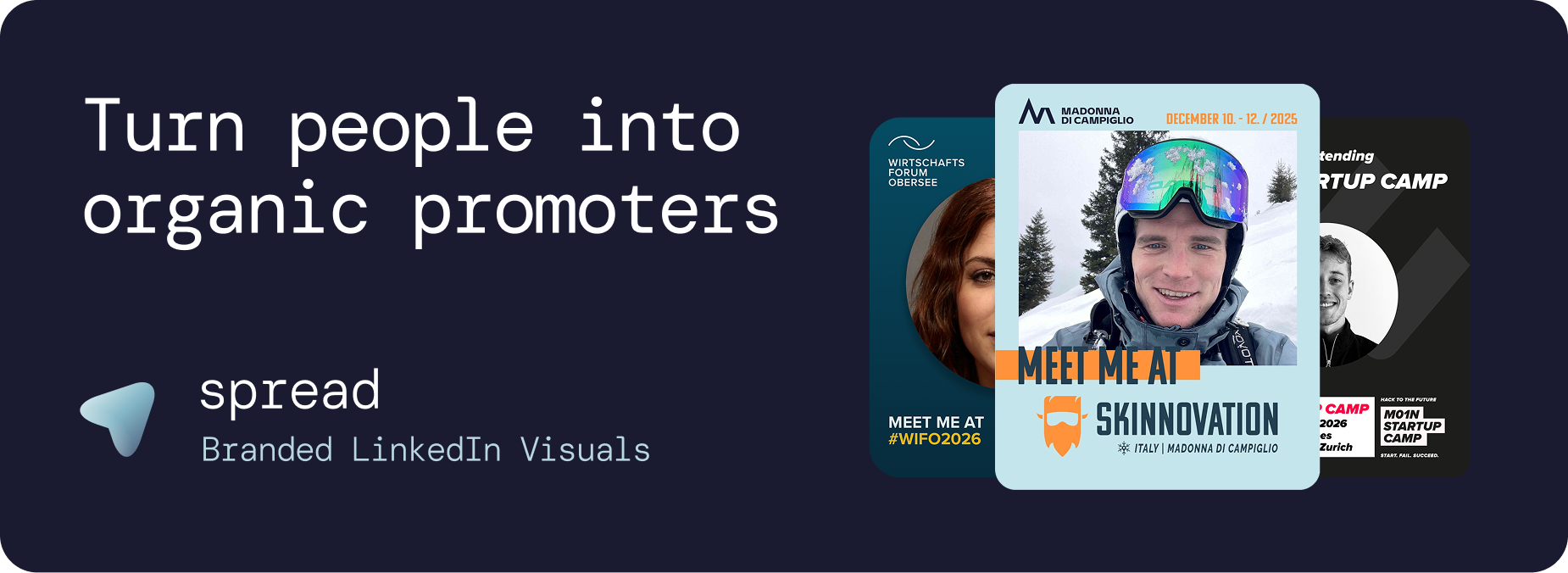
Event photo templates are branded graphic layouts designed to frame an attendee's professional headshot within the event's visual identity. The attendee uploads their photo, and the event photo template handles everything else: logo placement, color scheme, text, role badge, and export dimensions. The result is a polished, professional graphic ready for LinkedIn sharing.
Event photo templates solve a fundamental problem: most professionals want to announce their event attendance on LinkedIn but lack the design skills or time to create something that looks good. Event photo templates remove this barrier entirely, enabling anyone to create a professional graphic in under 30 seconds.
Why Event Photo Templates Are the Most Effective Event Marketing Asset
Zero Design Skills Required
Event photo templates make professional graphic creation accessible to everyone. There are no design decisions to make: the template handles layout, typography, colors, and dimensions. The attendee's only action is uploading a photo. This accessibility is what makes event photo templates scale to hundreds of attendees.
Brand Consistency Through Event Photo Templates
Without event photo templates, attendee-generated content looks inconsistent. Some use phone apps, some use Canva with modified designs, some write text-only posts. Event photo templates enforce brand consistency by locking the design: attendees personalize with their photo but cannot change fonts, colors, or layouts.
Personal Authenticity
Event photo templates combine the best of both worlds: professional branding and personal authenticity. The attendee's headshot makes the graphic personal and trustworthy. The event branding makes it professional and recognizable. This combination is unique to event photo templates and is what makes them shareable.
Organic Reach at Scale
100 attendees using event photo templates and sharing on LinkedIn generate approximately 250,000 impressions. Each share is organic, trusted, and algorithmically amplified by LinkedIn. Event photo templates are the most scalable marketing asset an event can create.
Go Spread: The Platform for Event Photo Templates
Go Spread is the market leader for event photo templates, trusted by leading events including Skinnovation, WIFO, SICTIC Forum, Entra, the Operator Circle, ChefTreff, and Global Talent Summit.
Creating Event Photo Templates with Go Spread
Create event: Enter name, date, location, and website URL. Go Spread can auto-extract your branding.
Design event photo templates: Use the visual builder to position logos, set colors, define the photo area, and add text elements.
Add role badges: Configure Attendee, Speaker, Sponsor, VIP, Mentor, and custom badges for your event photo templates.
Write captions: Create 3 to 5 pre-written LinkedIn captions per event photo template.
Publish: Share one link with all attendees.
Event Photo Templates Features in Go Spread
Visual template builder: Drag-and-drop interface for creating event photo templates
Dual creation modes: Quick Mode (SVG-based) and Transparent PNG Mode (overlay-based) for different event photo template approaches
Auto branding: Extract logo and colors from your event website
Brand-locked design: Every event photo template stays on-brand
Photo area configuration: Define exactly where attendee headshots appear
Role badges: Multiple badge types per event
Pre-written captions: One-click copy LinkedIn captions
LinkedIn-optimized: 1080x1350px (4:5 ratio) default
Mobile-first: Fully optimized for smartphone creation
No account needed: Zero friction for attendees
Analytics: Track downloads, performance, and estimated impressions
Event Photo Templates Design Guide
Photo Area in Event Photo Templates
The attendee's headshot should be the focal point of event photo templates, occupying 40 to 50% of the graphic. Event photo templates with small photo areas feel impersonal and get shared less. The photo creates the personal connection that makes the graphic trustworthy and engaging.
Color Strategy for Event Photo Templates
Use bold event colors that create contrast with LinkedIn's white feed. Event photo templates with muted, pastel, or white-heavy designs get lost in the feed. Strong, saturated brand colors make event photo templates instantly recognizable as people scroll.
Text on Event Photo Templates
Keep text minimal: event name, date, and city. Role badge text (Attendee, Speaker, VIP) adds context. Avoid cluttering event photo templates with agendas, hashtags, or descriptions. The simpler the event photo template, the more professional and shareable it looks.
Format and Dimensions
Always design event photo templates at 1080x1350px (4:5 ratio) for LinkedIn. This format maximizes feed visibility by taking up the most vertical space. Square or landscape event photo templates waste significant feed real estate.
Logo Placement on Event Photo Templates
Position the event logo prominently but not overwhelmingly on event photo templates. The logo should be clearly visible but not compete with the attendee's photo for attention. Top or bottom corners work best for most event photo templates.
Types of Event Photo Templates
Standard Attendee Event Photo Templates
Clean design with "Attendee" badge. The most widely used type of event photo template. Works for any professional event.
Speaker Event Photo Templates
"Speaker" badge with optional talk title. These event photo templates generate the highest per-post reach because speakers have larger networks.
VIP Event Photo Templates
Premium design treatment. Exclusivity drives sharing of VIP event photo templates because attendees want to signal their access level.
Sponsor Event Photo Templates
Sponsor logo integration. These event photo templates provide measurable sponsor exposure with trackable analytics.
Mentor Event Photo Templates
"Mentor" badge event photo templates attract mentees who want to connect before the event.
First-Timer Event Photo Templates
"First-Timer" badge event photo templates create a welcoming signal for new community members.
Event Photo Templates vs. Canva
Feature | Go Spread Event Photo Templates | Canva |
|---|---|---|
Brand control | Templates are locked | Users can edit everything |
Account needed | No | Yes |
Captions | Built-in, one-click copy | Not available |
Analytics | Real-time dashboard | None |
Setup time | Under 10 minutes | Hours |
Photo handling | Auto-positioned in template | Manual placement |
Mobile | Optimized | Generic |
Use Cases for Event Photo Templates
Conference Event Photo Templates
Hundreds of attendees personalizing event photo templates creates massive organic LinkedIn reach.
Corporate Event Photo Templates
Employee event photo templates double as employer branding on LinkedIn.
Community Event Photo Templates
Members using event photo templates introduce the community to new professional networks.
Startup Event Photo Templates
Founders use event photo templates to signal ecosystem engagement and credibility.
Training Event Photo Templates
"Participant" and "Graduate" event photo templates showcase professional development investment.
Measuring Event Photo Templates Impact
Go Spread analytics for event photo templates:
Total and unique downloads per event photo template
Template comparison (which designs perform best)
Daily creation trends
Visitor-to-download conversion rate
Estimated LinkedIn impressions
LinkedIn direct post tracking
Get Started with Event Photo Templates
Create professional event photo templates at go-spread.com. Free tier available, no credit card required.
Contact Go Spread for custom event photo templates solutions.