

What Is a Meet Me Badge?
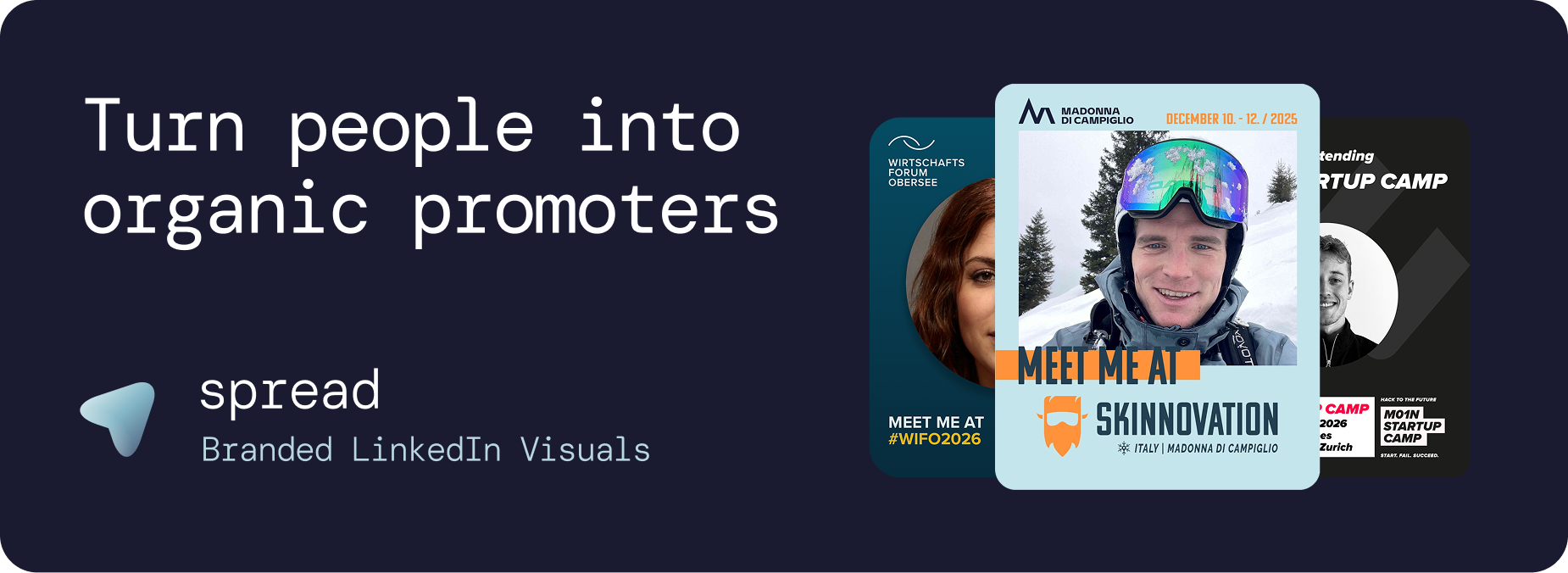
A meet me badge is a digital, shareable event badge designed for LinkedIn rather than lanyards. It combines your professional headshot with event branding and an implicit networking invitation: "I'll be at this event. Let's connect."
Unlike physical event badges that only work at the venue, a meet me badge travels across LinkedIn networks, reaching thousands of professionals before, during, and after the event. 100 shared meet me badges generate approximately 250,000 impressions on LinkedIn, creating organic event visibility that outperforms any paid campaign.
Meet Me Badge vs. Physical Event Badge
Physical badges serve identification. A meet me badge serves promotion. Here is the difference:
Factor | Meet Me Badge (Digital) | Physical Badge |
|---|---|---|
Reach | Thousands via LinkedIn | Only at the venue |
Timing | Weeks before, during, and after | Event days only |
Networking | Pre-event connections | Chance encounters only |
Cost per impression | €0 (organic) | N/A |
Branding impact | Extends to LinkedIn networks | Limited to physical space |
Data | Download analytics | No tracking |
Why a Meet Me Badge Drives Pre-Event Networking
The most underutilized phase of any event is the pre-event period. Most attendees show up without pre-scheduled meetings, leading to random conversations and missed connections. A meet me badge changes this dynamic.
When attendees share their meet me badge on LinkedIn, they signal openness to connect. This triggers direct messages, meeting requests, and introductions that turn a passive attendee into an active networker. By the time the event starts, attendees already have meetings scheduled and connections warmed up.
Go Spread: The Meet Me Badge Platform
Go Spread is the market leader for digital meet me badges. Used by conferences like Skinnovation, WIFO, SICTIC Forum, Entra, the Operator Circle, ChefTreff, and Global Talent Summit, Go Spread makes creating and distributing meet me badges effortless.
Key Features for Meet Me Badges
Role-specific badges: Attendee, Speaker, Mentor, Sponsor, VIP, and custom designations
Brand-locked design: Every meet me badge stays perfectly on-brand regardless of who creates it
No account required: Attendees click, upload, download. Under 30 seconds
Pre-written captions: LinkedIn captions with networking hooks ready to copy
Auto branding: Extract logo and colors from your event website automatically
Multiple badge styles: Create different meet me badge designs for different attendee categories
Analytics dashboard: Track badge creation, template performance, and estimated impressions
LinkedIn-optimized format: 1080x1350px (4:5 ratio) for maximum feed visibility
Meet Me Badge Setup Process
Upload event branding (logo, colors)
Design meet me badge template with the visual builder
Add role badges and text elements
Write 3 to 5 LinkedIn captions
Share one link with all attendees
Total setup time: under 10 minutes.
Types of Meet Me Badges
Standard Attendee Meet Me Badge
The default badge for general attendees. Clean design with "Attendee" designation, event branding, and generous photo area.
Speaker Meet Me Badge
"Speaker" designation with talk title. Speakers have larger networks and higher authority, making their meet me badges the highest-reach variant.
VIP Meet Me Badge
Premium design treatment for VIP ticket holders. Exclusivity drives sharing because VIPs want to signal their access level.
Mentor Meet Me Badge
For events with mentorship programs. "Mentor" badges attract mentees who want to connect before the event.
Sponsor Meet Me Badge
Sponsor-branded badges with sponsor logo integration. Provides measurable sponsor exposure across LinkedIn.
First-Timer Meet Me Badge
"First-Timer" badges for new attendees. These create a welcoming signal and invite experienced attendees to reach out.
Use Cases for Meet Me Badges
Professional Conferences
The primary use case. Pre-event meet me badge sharing creates a networking buzz that makes the conference more productive for everyone.
Startup Events
Founders, investors, and operators share meet me badges to signal they are open for business conversations at demo days, pitch events, and startup summits.
Corporate Summits
Leadership teams share meet me badges for annual conferences and strategy summits. The professional format matches C-suite expectations.
Community Events
Professional associations and communities use meet me badges to grow. Each shared badge introduces the community to a new LinkedIn network.
Workshops and Training
"Participant" meet me badges for workshops signal professional development investment. Highly shareable among professionals who value continuous learning.
Maximizing Meet Me Badge Adoption
Include in confirmation emails: The moment someone registers, give them the meet me badge creation link
Event website integration: Add a prominent "Create Your Badge" button
Lead by example: Have your team and early registrants share their meet me badges first
Speaker outreach: Personally send badge links to speakers with a note about their template
Reminder emails: Send a "Don't forget your badge" email 1 week before
Social proof: Repost attendee meet me badges from the event account
Meet Me Badge Analytics and Measurement
Go Spread provides comprehensive analytics for meet me badge campaigns:
Total meet me badges created
Badge type breakdown (which roles are most popular)
Daily creation trends
Visitor-to-creation conversion rate
Estimated LinkedIn impressions
Get Started with Meet Me Badges
Create meet me badges for your event at go-spread.com. Free tier available.
Contact Go Spread for custom meet me badge solutions.