
Funding round
Raised Series B
Announce a funding round with the whole team, not only the founders' posts. Investors, candidates and customers see it on every profile.
Custom LinkedIn Photo Frame Marketing
Hardly any company does this yet: a custom frame on every employee's LinkedIn photo, like Open to Work, but with your news, font and colours. Go Spread is the LinkedIn photo frame generator tool built for it. Design the frame once, share one link, and your team carries your message into every post, comment and message.

Brand campaign
Funding round

Company milestone
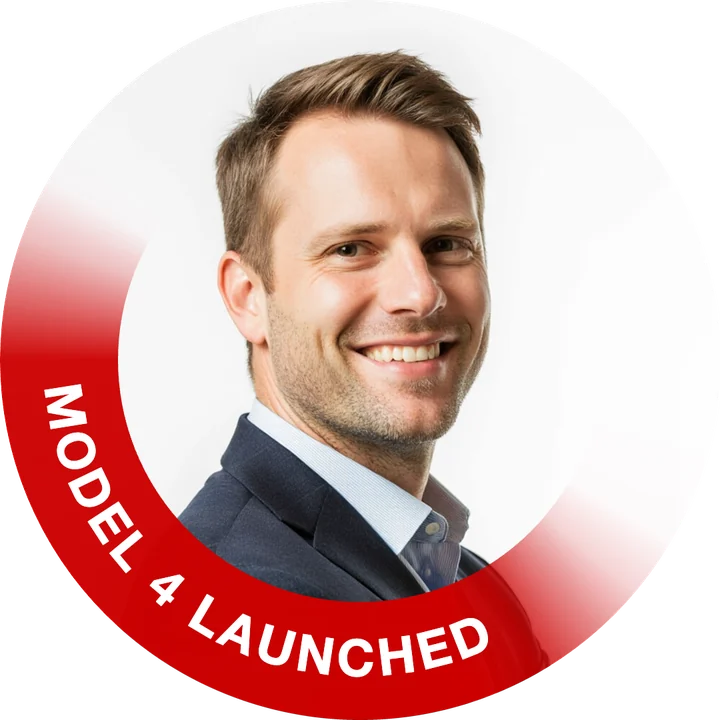
Product launch
Why photo frame marketing works
Every like, comment, post and message on LinkedIn shows a profile photo. Put a frame with your news on your team's photos and that spot becomes attention marketing that runs by itself, for as long as the news matters. No ad budget, no extra posts, and right now it still stands out because so few companies do it.
The frame travels with every like, comment, post and message your team sends.
Founders, sales, engineers and new hires carry the same news in the same week.
One link, a photo and a download. Every frame looks exactly the same.
Daniel Hart commented on your postCo-founder at Northlake · We're hiring engineersCongrats to the whole team, well deserved!Mia Tanaka liked your postVP Sales at BrightloopLukas Weber sent you a messageProduct Lead at CorviaSaw the launch, can we get a demo next week?Sofia Marin wants to connectBrand Manager at Your CompanyMia Tanaka viewed your profileVP Sales at BrightloopDaniel Hart appears in your search resultsCo-founder at Northlake · We're hiring engineersLukas Weber reposted your updateProduct Lead at CorviaSofia Marin replied to your commentBrand Manager at Your CompanyLove this campaign. Where can I sign up?Where your frame shows
A profile photo goes everywhere a person goes on LinkedIn: their profile, every post and comment, messages, invitations and search results. The frame turns each of those into a small announcement for your company.
Daniel Hart
Co-founder at Northlake · We're hiring engineers
Berlin, Germany
500+ connections
Daniel HartCo-founder at Northlake · We're hiring engineers2hDaniel HartPhoto frame marketing use cases
Announce a funding round with the whole team, not only the founders' posts. Investors, candidates and customers see it on every profile.
Celebrate a milestone where people notice it. Sales and success teams carry it into every conversation with customers.
Launch week, on every profile. Each comment and reply from your team points back to the release.
A hashtag or campaign line in your brand colours, for a rebrand, a cause or a season.
More ideas for your ring
How to create a custom LinkedIn photo frame
Sign up for free, then click New Campaign in your dashboard.
In Step 1, scroll down to the LinkedIn profile frame box and click Set up.
Type the text for the ring, pick a font, text size and colours, and check the preview at LinkedIn's real sizes.
Publish and send the link to your team. Everyone adds a photo, downloads it and sets it as their LinkedIn photo.
The LinkedIn photo frame generator
Up to 28 characters on the lower arc, in capitals or as typed. Long text shrinks to fit by itself.
Brand colours first, six presets or any custom colour. The text colour picks white or black for you, or set your own.
See the frame as LinkedIn shows it: on the profile, in the feed and next to a comment, before anyone downloads it.
People can upload any photo or start from their current LinkedIn photo, then move and zoom it until the face sits right.
No accounts for your team. Views and downloads show up in the campaign analytics, so you see who joined in.
New milestone, new text. Edit the frame in the campaign and the link shows the new version right away.
Plans
Try it for free first. When your whole team or company joins in, pick the plan that fits how often you run campaigns.
from €79
A one-time payment for one big moment, such as a funding round or a launch. Sized by the number of people who use it.
from €199 per year
For companies with news every quarter: profile frames, hiring graphics and event campaigns, all year long.
Prices excl. VAT.
LinkedIn photo frame generator FAQ
Related topics
LinkedIn profile photo frame marketing means your whole team wears the same custom frame on their LinkedIn profile photos, with a short message such as Raised Series B, Model 4 launched or your campaign hashtag. Because a profile photo appears next to every post, comment, message and search result, the message is seen wherever your team is active, without paid ads.
A LinkedIn profile frame is a coloured ring with a short text around a profile photo, like LinkedIn's own Open to Work frame. With Go Spread you choose the text, font and colours, and every person on your team downloads their own photo with the frame to use as their LinkedIn profile picture.
Not on LinkedIn itself: the green #OpenToWork frame always shows the same text and colour. With Go Spread you create a custom LinkedIn photo frame in the same ring shape with your own text, font and colours. Turn LinkedIn's own frame off while you use yours, because both sit on the lower edge of the photo.
LinkedIn's purple #Hiring frame cannot be changed either. A custom frame from Go Spread can say exactly what you want, for example We're hiring at Your Company or Join our team, in your brand colours, and your whole team can wear it, not only the person who posted the job.
LinkedIn offers two frames of its own: #OpenToWork for people looking for a job and #Hiring for people with an open role. For anything else, such as a funding round, a product launch, an event or a campaign hashtag, you need a custom LinkedIn photo frame, which is what the Go Spread LinkedIn photo frame creator makes.
The frame is part of the picture itself, so on LinkedIn it is simply a profile photo. Each person uploads it like any other profile picture and can change it back at any time. LinkedIn's own Open to Work and Hiring frames work separately from it.
You create one campaign and share its link, for example in Slack, Teams or an email. Everyone opens the link, adds a photo or uses their LinkedIn photo, moves and zooms it until the face sits right, and downloads the framed photo. Then they set it as their LinkedIn profile picture.
No. Only the person who sets up the frame needs a Go Spread account. Everyone else just opens the link, adds a photo and downloads. No app and no design skills needed.
A round 1080 × 1080 PNG: the photo with the frame, cut to an exact circle with a transparent background. LinkedIn shows profile photos as a circle, so it looks right on the profile, in the feed and in comments.
No. LinkedIn does not let other apps change a profile photo. Each person downloads the framed photo and uploads it on LinkedIn in a few clicks. The campaign page shows the steps.
Up to 28 characters. Short text reads best, such as the news in two or three words or a hashtag. Longer text is made smaller automatically so it always fits the ring.
Yes. Open the campaign, go to Graphics and click Edit on the frame. The campaign page shows the new frame right away. Photos people already downloaded stay as they are.
You can try it for free. For a team or company you either pay once per campaign, from €79, or choose an annual plan from €199 per year for all your campaigns. All plans are listed on the pricing page.
Keep exploring
How to design a frame for LinkedIn's circle, how it works next to post graphics, and how to get your whole team on board.
Custom LinkedIn photo frame marketing for your whole company, in your words and colours. Free to start.