
LinkedIn Graphic Creator for Events
LinkedIn is where professional decisions happen. When event attendees share branded graphics on LinkedIn, they reach the exact audience that matters: decision-makers, industry leaders, potential clients, and future collaborators. A dedicated LinkedIn graphic creator for events is not a nice-to-have. It is essential for modern event marketing.
The numbers prove it: 100 attendees sharing event graphics on LinkedIn generate approximately 250,000 impressions. This organic reach comes from trusted personal connections, making it far more valuable than paid impressions from any advertising platform.
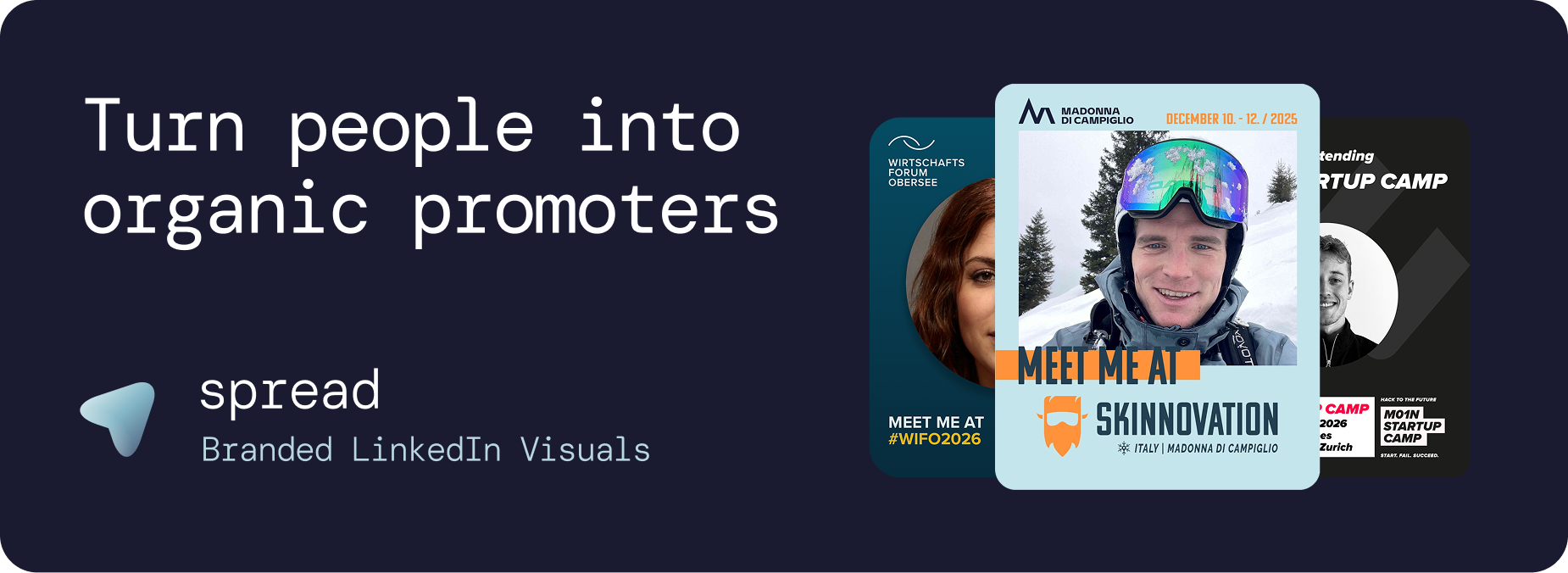
Why Generic Design Tools Fail as a LinkedIn Graphic Creator
Many organizers try to use Canva, Adobe Express, or similar tools as their LinkedIn graphic creator. These tools are excellent for individual design work, but they fundamentally fail at the scale events need:
The Account Problem
Canva requires every attendee to have an account. For a conference with 500 attendees, this means 500 people need to create or log into Canva, find the right template, and figure out the tool. Adoption rates plummet.
The Brand Control Problem
Generic design tools give users full editing power. Attendees change fonts, move elements, alter colors, and produce graphics that no longer match your event branding. Your carefully crafted visual identity gets diluted across hundreds of inconsistent variations.
The Analytics Problem
Canva cannot tell you how many attendees actually created graphics, which templates perform best, or how many estimated impressions your event generated. You are flying blind.
The Caption Problem
The biggest barrier to sharing is not creating the graphic. It is writing the LinkedIn caption. Without pre-written captions, attendees procrastinate and never post. A proper LinkedIn graphic creator solves this critical step.
What we have seen at more than 20 conferences and events using Go Spread from February - April, is a strong rise in conversion towards downloads and posts. Depending on the amount of internal promotion of the shared links, around 10-15% of attendees postet graphics through Go Spread. That enables organic reach in the millions.
Go Spread: The LinkedIn Graphic Creator Built for Events
Go Spread is purpose-built as a LinkedIn graphic creator for events, used by top conferences like Skinnovation, WIFO, SICTIC Forum, Entra, the Operator Circle, ChefTreff, and Future Leader Summit.
How the LinkedIn Graphic Creator Works for Organizers
Auto-branding: Enter your event website URL. Go Spread extracts your logo, colors, and event details automatically.
Template builder: Create LinkedIn-optimized templates (1080x1350px, 4:5 ratio) with the visual drag-and-drop builder.
Role templates: Create separate templates for attendees, speakers, sponsors, mentors, and VIPs.
Caption library: Write 3 to 5 pre-written LinkedIn captions per template with networking hooks and hashtags.
One link: Share a single URL via email, website, and social media. That is it.
How the LinkedIn Graphic Creator Works for Attendees
The attendee experience is designed for maximum conversion:
Click the link (any device, no account needed)
Upload a professional photo
Choose a template variant
Copy a pre-written caption
Download and share on LinkedIn
The entire process takes under 30 seconds. No design skills, no creative decisions, no friction.
LinkedIn-Specific Optimization in the Graphic Creator
4:5 Aspect Ratio
The default 1080x1350px format takes up maximum vertical space in the LinkedIn feed. This means your event graphic occupies more screen real estate than square or landscape images, increasing visibility and engagement.
Feed-Ready Colors
LinkedIn's feed has a white background. Go Spread encourages bold, contrasting colors that stand out against this white canvas. Templates that pop in the feed get more attention.
Caption Integration
LinkedIn's algorithm favors posts with substantial text. Go Spread's pre-written captions include networking hooks, industry insights, and strategic hashtags that boost algorithmic distribution alongside the visual.
Personal Content Signal
Because each graphic features the individual's photo and is posted from their personal profile, LinkedIn treats it as authentic personal content, not promotional material. This gives it 3 to 5 times more distribution than company page content.
Use Cases for a LinkedIn Graphic Creator
Pre-Event Promotion Graphics
The classic use case. Attendees share "I'm attending" or "Meet me at" graphics to announce their participation. This creates a wave of visibility that builds momentum and drives additional registrations.
Speaker Announcement Graphics
Speakers have larger networks and more influence. Dedicated speaker templates with talk titles and speaker badges generate outsized reach. A single speaker post can generate thousands of impressions.
Live Event Sharing
During the event, attendees create graphics with on-site photos. This real-time sharing creates FOMO for non-attendees and drives interest in future events.
Post-Event Recap
"I was at" graphics with key takeaways extend the event's impact beyond the venue. Attendees share insights and tag connections they met, creating lasting professional relationships.
Employer Branding Graphics
Companies sending employees to conferences use a LinkedIn graphic creator as employer branding. Employee shares signal a company that invests in professional development.
Community Growth Graphics
Professional communities use a LinkedIn graphic creator to grow membership. When members share branded community visuals, their networks discover and join the community organically.
Measuring LinkedIn Graphic Creator Performance
At Go Spread, we are working hard on creating as many insights as possible for our existing and future partners. We therefore provide analytics specifically designed for LinkedIn event graphics:
Download tracking: How many unique graphics were created
Template comparison: Which variants perform best
Daily trends: When downloads peak (optimize email timing)
Estimated impressions: Projected LinkedIn reach based on download volume
Visitor-to-download conversion: How well your distribution strategy works
LinkedIn direct posts: Track graphics shared directly to LinkedIn through Go Spread
LinkedIn Graphic Creator Pricing
Go Spread offers a free tier for smaller events and flexible plans for larger conferences. All plans include the full LinkedIn graphic creator workflow: template builder, caption management, and analytics.
For custom enterprise pricing, contact Go Spread to find the most fitting solution for your LinkedIn event marketing strategy.
Get Started with a LinkedIn Graphic Creator
Create your first LinkedIn event graphic in under 10 minutes at go-spread.com. No credit card required for the free tier.